UI Studio#
The SHIFT UI Studio provides a browser-based workflow for building and comparing synthetic feeder topologies using the same core primitives as the Python API.
Install#
pip install -e ".[ui]"
Run#
shift-ui-server
Open http://127.0.0.1:8000.
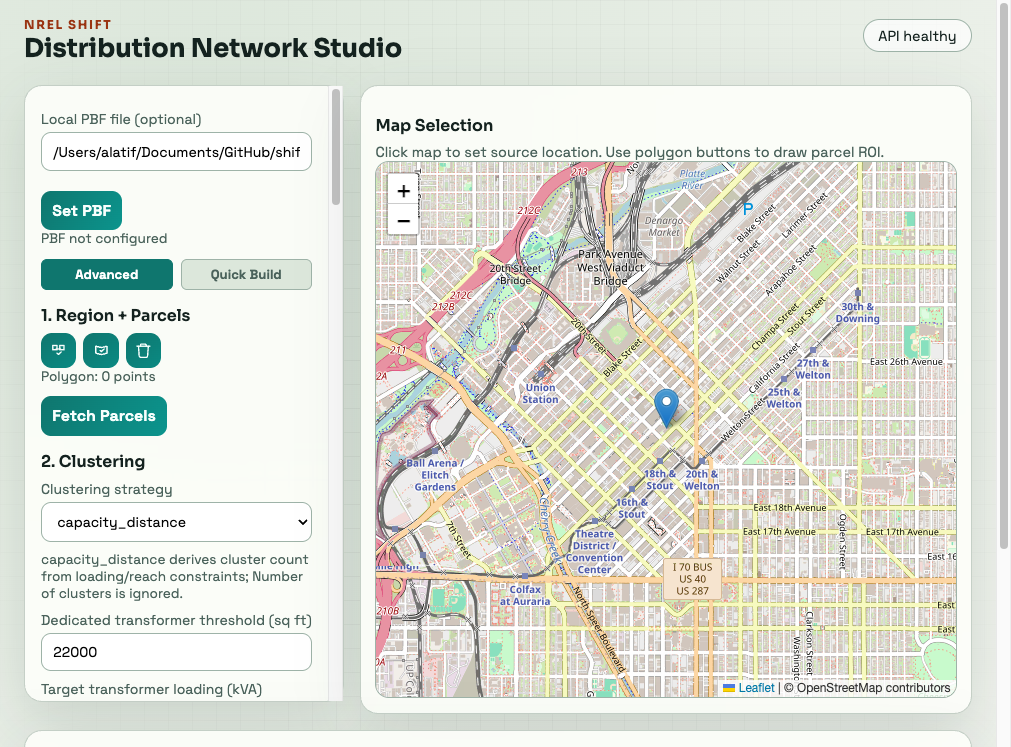
The page is split into a control panel and a map. The API status indicator in the upper-right confirms that the browser can reach the running SHIFT server. The map uses OpenStreetMap tiles and shows parcels, clusters, roads, source locations, and graph elements as each step is completed.
Prepare Local Data#
The UI can query OpenStreetMap over the network, or use a local road extract when working offline or with a large study area. To use a local PBF:
Prepare an OSM PBF file that covers the study area.
Enter its absolute path in Local PBF file.
Select Set PBF. The status text below the button should confirm that the file is configured.
The local PBF path is machine-specific and is not bundled with SHIFT. Parcel and road requests still require the relevant source data or an internet connection. The UI session is in memory, so restart-dependent state such as the configured PBF and built systems must be set up again after restarting the server.
Current Workflow#
Advanced mode#
Use Advanced when you want to inspect or control each modeling stage:
Draw a region with the polygon controls, or use the map to select a source location.
Select a clustering strategy and configure transformer, loading, and secondary-reach constraints.
Select Build Clusters. The resulting transformer candidates appear on the map.
Optionally select Snap to Roads to move candidates toward the road network.
Choose a network type and routing and secondary strategy overrides, then select Build Graph.
Configure phase, voltage, and equipment mappings in the later control-panel sections.
Build the system, inspect the result, and download the JSON or bundle output.
Use Compare when available to build two selected strategy combinations and compare their topology metrics without replacing the individual configuration choices.
Quick Build mode#
Use Quick Build for a shorter path from a study region to a complete GDM model:
Draw and close a polygon on the map.
Pick a source location from the map.
Enter the system name, transformer settings, voltages, and optional catalog path.
Choose whether to run the iterative power-flow fix, then select Build GDM System.
Review the build log and download the latest fixed bundle when a fix run produces one.
Quick Build combines parcel loading, clustering, graph construction, mapping, system assembly, and optional violation fixing into one operation. The Advanced mode exposes those stages separately for experimentation and diagnosis.
Map Controls#
Start polygon, Close polygon, and Clear polygon control the study boundary.
Pick source enables map clicks for the substation/source location; Reset source restores the default location.
The map zoom controls change the visible area without changing the selected polygon.
Status text below each control reports the current point count, source, or server response.
The control panel scrolls independently from the map. On a narrow browser window, scroll the panel to reach the clustering, graph, mapper, and system sections.
Available Network Presets#
balanced_default:SteinerTreeStrategy+MeshSteinerStrategyroad_optimized:WeightedSteinerTreeStrategy+OpenStreetSecondaryStrategyfull_road_exploration:FullRoadGraphStrategy+HubLineStrategy
Exposed API Endpoints#
GET /api/healthGET /api/optionsPOST /api/catalog/transformersPOST /api/parcels/fetchPOST /api/parcels/fetch-localPOST /api/config/local-pbfPOST /api/clusters/buildPOST /api/clusters/snap-to-roadsPOST /api/graph/buildPOST /api/roads/networkPOST /api/graph/comparePOST /api/feeders/auto-buildGET /api/graph/{graph_id}/transformersPOST /api/mapper/phasePOST /api/mapper/voltagePOST /api/mapper/equipmentPOST /api/system/buildPOST /api/system/exportGET /api/system/{system_name}/downloadGET /api/system/{system_name}/download-bundleGET /api/session/summaryPOST /api/system/fix-violationsPOST /api/system/build-fullPOST /api/system/quick-buildGET /api/logs/stream
Notes#
Session state is in-memory and resets when the server restarts.
UI compare mode is intended for rapid topology exploration and metric inspection.
Mapper/system endpoints are available and can be progressively surfaced in the UI controls.